Engineering demystified
What is "the cloud"?
"There is no cloud, there's just other computers!" they say. What?!

Quinn Daley they/them or she/her
Technical leadership consultant

I’ve spent most of my time so far on this blog talking about leadership, but aren’t I supposed to be a technical leadership consultant?
This is the first post of a series I’m calling “Engineering demystified”. When you work with engineers (or even if you are an engineer yourself), you’ll hear a lot of shared terminology and jargon. Sometimes it feels like you’re expected to understand it, but where do you even go to understand the basics? That’s the hole I hope to fill with this series of blog posts.
“The cloud” in one sentence
All internet applications need to run on computers somewhere: if you don’t own the computers your application runs on, then your application is hosted in the cloud.
The cloud isn’t a place, it’s a business model. It’s utilising economies of scale by delegating responsibility for your application’s hardware to someone who can manage your application alongside many others.
Making decisions about cloud hosting
When you are setting out to build something new, you might need to make decisions about where the application should be hosted.
In some ways, this decision can be quite arbitrary. The differences between the big providers often come down to personal taste and experience. But even if you have a preferred supplier (e.g. Amazon vs Microsoft), the big players each have so many offers within their suite that it helps to understand the different kinds of cloud hosting and their advantages and their disadvantages.
Note: In each of the examples below, I include a section about considerations - why you might choose one over the other. I’ve separated these sections out so you can skip over them if you’re mostly here for the definitions!
Vendor lock-in
One thing to be especially concerned about is vendor lock-in. Many suppliers naturally design their products so that you will use architectures and conventions that are unique to their infrastructure, making it harder for you to change providers if they put their prices up or reduce the quality of their service.
It’s important to design applications in a way that is modular, so that the parts which are built on proprietary infrastructure conventions are only thin layers that can be redesigner or rewritten without having to throw away the bulk of your codebase and start again.
A bit of history
Back when my engineering career started in the early 2000s, most internet applications were hosted on physical servers owned by the companies that built them. Indeed, one of my first jobs was writing code to manage a huge physical “server farm”.
Local area networks were often depicted with complex network diagrams showing how all the devices were connected through switches and routers and so forth. But for internet applications there was so much complexity in the internet itself (ISPs, backbones and so forth) that it was often depicted just as a large cloud in the middle of the diagram, indicating “we don’t care how it works, because we know it does”.
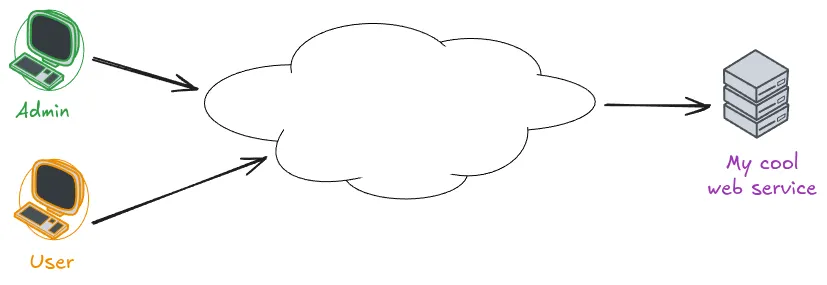
As time went on, more and more providers appeared offering to manage your hardware for you. This was great because you didn’t have to worry about where to house your servers, how to manage security patches and so forth. The provider could do this for you and all their other customers at the same time.
The effect of using one of these providers was a little like moving your own infrastructure into the mysterious cloud in the middle of the network diagram, and it started to be known as “moving applications into the cloud”.
Types of cloud
There are so many different ways you can host an application in the cloud. In this part of the post, I’ll talk you through the main kinds of offerings you might hear about and what the differences between them are.
A complex web application might use more than one of these. For example, it might use a PaaS for hosting the application code itself, buy scalable storage from an IaaS to store users’ uploaded files and use a CDN for its own static images and stylesheets. Indeed, this example is how name.pn works now.
Virtual private server (VPS)
This option isn’t always included in the definition of the cloud, but I’m including it for completeness.
A virtual private server, or VPS, is when you buy something from a provider that looks very much like a traditional physical server. You can install your own operating system onto it, and you can - if you like - run all the services your application needs directly on this machine. For example, you could have your web server and your database sitting side by side, just like they might do on your development machine.
The “virtual” part indicates that your server is probably actually a virtual machine, running on top of some much more complex infrastructure at the provider, such as a VMware vSphere, but from your perspective it’s just the same as having a physical server all of your own.
Popular VPS offerings include Digital Ocean’s droplets, Hostinger and Amazon’s EC2.
Why VPS? Why not?
Choosing this option is certainly simple, and it gives you a huge degree of control over the system. It’s familiar and easy to understand, because it behaves just like the machine you used to develop the application.
Using a VPS could be a challenge when you want to scale your application because typically you will need to scale different components in different ways (it’s not uncommon for people to use a VPS only for custom-built components of their application in this situation); and having such low-level access to the underlying operating system means you need to employ people to do things like security patches, log aggregation and rotation, and so forth.
It can be a very cheap solution, though, and is often the solution of choice for cash-strapped businesses like tiny charities. An interesting development in recent times is Kamal which gives teams more of a PaaS-type experience whilst paying only for VPS hardware.
Infrastructure as a service (IaaS)
If you work in a larger organisation, you’ve almost certainly encountered an IaaS provider. The most popular IaaS providers by far are Amazon Web Services (AWS), Microsoft Azure and Google Cloud Platform (GCP), although there are others.
IaaS providers will offer VPS services (like AWS’s EC2) but they’ll also offer additional services that take away the burden of managing and tweaking specific components of your application.
For example, AWS provides services like:
- RDS (Relational Database Service): Run popular databases like SQL Server and PostgreSQL without worrying about where or how they’re installed
- S3 (Simple Storage Service): Kind of like a disk that has unlimited size - great for handling your users’ uploaded files without worrying about disks getting full
- Media Services: Transcode and deliver video content to your users in a format that matches their device needs
These are just 3 examples of services that are available on one of the most popular IaaS providers. AWS has 240 such services available!
Why IaaS? Why not?
Using an IaaS is a popular solution for anyone with a complex application or one with serious NFRs around reliability, performance and scale. Hosting all the components of such a complex application on a collection of VPSes will have diminishing returns because of the maintenance burden of each of those individual servers. Paying someone to install, host, configure and tune these specialist components will often provide much better quality and ease of integration.
But an IaaS still requires specialists to operate it. Indeed, because each of these components has its own interfaces to learn, your team have to be trained in all the components they use. It will also require senior/experienced people who understand how to define the architecture of your system to make the best use of the infrastructure available. It’s great for any complex application, especially if it’s your company’s core product, but it might provide unnecessary complexity and people costs if you could get away with one or more of the simpler solutions below.
Platform as a service (PaaS)
A PaaS provides a level of abstraction on top of IaaS.
Where an IaaS gives you the power and flexibility to design your architecture in ways that fits your business needs, a PaaS follows the philosophy that your application’s architecture isn’t a special snowflake, and it could probably conform to some constraints and conventions.
For example, Heroku requires your application to conform to the Twelve-Factor specification. Every PaaS has a similar set of constraints, which might be things like:
- Your application must be able to run on a read-only filesystem
- Your application may only be configured through key-value pairs of strings
- Your application must place all its logs in this designated place
A skilled engineer designing an application will likely be able to make it conform to any of these constraints, but they’re by no means universal architectural principles that everyone conforms to.
Beyond Heroku, other popular PaaS offerings are Google App Engine and Amazon Elastic Beanstalk.
Why PaaS? Why not?
By forcing applications to conform to a known specification and set of constraints, PaaS providers can offer significantly greater operational simplicity. Often, they allow the whole infrastructure management experience to be controlled from a nice web portal. This allows you to operate your application effectively with a smaller or less experienced team. Indeed, I’ve onboarded many non-technical founders to Heroku.
The downsides of the PaaS model are the drastically reduced flexibility - you have to do things their way (although you can still use an IaaS for any components that don’t fit) - and of course the higher actual rental/usage costs, since you’re transferring some of that expertise to your supplier rather than needing to hire it in-house. For “normal” applications with smaller teams, this is often cost-effective, since you can get by with fewer staff, but it’s no substitute for a real engineering team if you have a complex or mission-critical application.
Content Delivery Network (CDN)
Applications typically contain a lot of content that’s exactly the same for everyone who uses them. Most have stylesheets and images, JavaScript bundles and other assets. If your application is (even in part) a website or blog, then maybe even the bulk of your actual content is pretty static.
That’s what a CDN is for. It allows you to move the static content of your site onto physical servers around the world so that people can download them as quickly as possible. (Interestingly, being physically close to servers lowers latency, which isn’t so much of an issue if you use http/2 properly, but that’s one for another day.)
Popular CDNs include Cloudflare, Fastly and Amazon CloudFront.
How much can live on a CDN?
In fact, this website is built using the Astro static site generator and then deployed to Cloudflare’s CDN. No part of it is running on any servers (in the traditional sense) except when I’m updating it - all the content is served directly from the CDN.
Similarly, Likely2 is a progressive web app - the first time you visit it, the whole application copies itself to your device from the CDN and then it runs locally on your device. The only thing it needs each day is a new prompt, for which it uses…
Serverless
This final category is perfect for when your application does something small, or even if it is quite complex but its architecture is made up of separately deployable units - or functions, each attached to a different URL.
“Serverless” means delegating every aspect of running your application to the cloud provider, leaving you only to write the code that handles the HTTP request and sends a response back. Of course, it’s not really running without servers - it’s just so abstract that as a developer or maintainer, you can’t (and don’t need to) know anything about the servers where it runs.
Popular serverless providers include Cloudflare Workers (where Likely2’s one API function runs), Amazon Lambda and Azure Functions. Netlify and Vercel are both a combined CDN and serverless, forming a kind of futuristic PaaS.
Why serverless? Why not?
Serverless can be great if you want a very low maintenance application, because it delegates all the responsibility for running the hardware entirely to your supplier. The flipside is that you generally have to design your application specifically to run on a specific provider’s infrastructure, leading to vendor lock-in.
Why might you go for a traditional on-premises solution?
The cloud is so pervasive now that most teams wouldn’t even consider running everything themselves on their own servers. But this is still an option and the internet still does work the way it did way back in the early 2000s.
Some reasons you might want to do this:
- You don’t want to be beholden to a tech giant - increasingly, Microsoft and Amazon control the bulk of the internet. Even if you buy your services from someone else, they are likely buying some of their services from Microsoft or Amazon.
- You are building something that the big providers don’t like - many of the big cloud environments prohibit the building of, for example, gambling tech or adult content sites.
- You need your data to be really secure - this is a double-edged sword because the big companies probably know a lot more about security than you do, but of course you’re still trusting them with your data. The only truly cybersecure environment is one that’s not connected to the internet at all (known as an “airgapped” environment).
“Modern” options for running things on your own hardware include PaaS-like systems like Dokku and Kamal, or going all-in on Kubernetes, which I talk about more at the end of this article.
Other common questions
This article’s already quite long so I’m not going to go into too much detail, but it’s important to mention these two things whenever we talk about the cloud.
What is Infrastructure as Code (IaC)?
Cloud providers typically let you get things set up with a few clicks, and even the most complex ones like AWS let you create all your infrastructure with a nice point-and-click web interface.
But this doesn’t really work for production-grade infrastructure or anything managed by a team of more than one person: How do you remember what you did so you can document it or recreate it in the future? How do you share what you did with your team members? How can you see what your infrastructure looked like before or after a big change, or roll back to an earlier infrastructure when you roll back to an earlier release of your code?
The answer is to keep all your infrastructure designs in your codebase alongside your code. This way, you can apply all the same rigour you apply to the codebase itself - version control, code reviews, documentation, automated testing - to your infrastructure without having to reinvent any wheels.
Popular IaC platforms include Terraform, Pulumi and Amazon Cloud Development Kit (CDK).
And what on earth is Kubernetes (k8s)?
Kubernetes (often shortened to k8s) is a vendor-independent control system for cloud architectures.
Your code can describe both the hardware/resources that are available, and what your various applications require to run. Then it has something called a control plane which looks at the available resources and matches them to the requirements for the various applications you’ve deployed onto it. Each of the individual components is typically built using the Open Container format popularised by Docker.
The main advantage of k8s is that it works the exact same way whether your code is running on a development machine, your own private servers, a VPS, or a managed k8s service like Amazon EKS or Digital Ocean Managed Kubernetes.
It’s a great idea but unfortunately right now it’s quite complex to understand. There’s a system called Helm which is like the k8s equivalent of a dependency manager (like npm or python-pip), and it makes it a little easier to understand.
If your team has the right people, using k8s to build out your architecture and then swapping out specific components for IaaS managed services when you go into production can make your team’s development and bugfixing processes lightning-fast because everything is basically the same on the developer’s laptop as it is in the cloud. But it’s also probably (at least in 2026) too much lore to learn for the average small tech team.
The next “engineering demystified”…
Did you enjoy this? I hope there was something in here for everyone: especially non-engineers working with engineers, but even for fellow engineers.
If something in here still doesn’t make sense, I’d love to hear what you think I could improve. Or if this was too long and too deep, let me know that too!
If you want more of these sorts of articles, I’d love to know more about what engineering concepts you hear about often, in reports or meetings or briefings, that I can help demystify for you.
Get in touch here or comment on one of my LinkedIn posts. I want to create content that’s useful to you and taking requests is the best way to do that!!
Fish Percolator is a technical leadership consultancy based in Yorkshire.
If your team is not running as smoothly as you'd like, you have long gaps between releases or bugs in production, or your people are not excited about coming to work every day... we can help!